Vortex Crew: Document Management Platform for Seafarers
Role-based platform for seafarer document management: AI-assisted Magic Scan with MRZ validation, expiry alerts, submission workflow, and auto-generated CV, built on Google Apps Script.
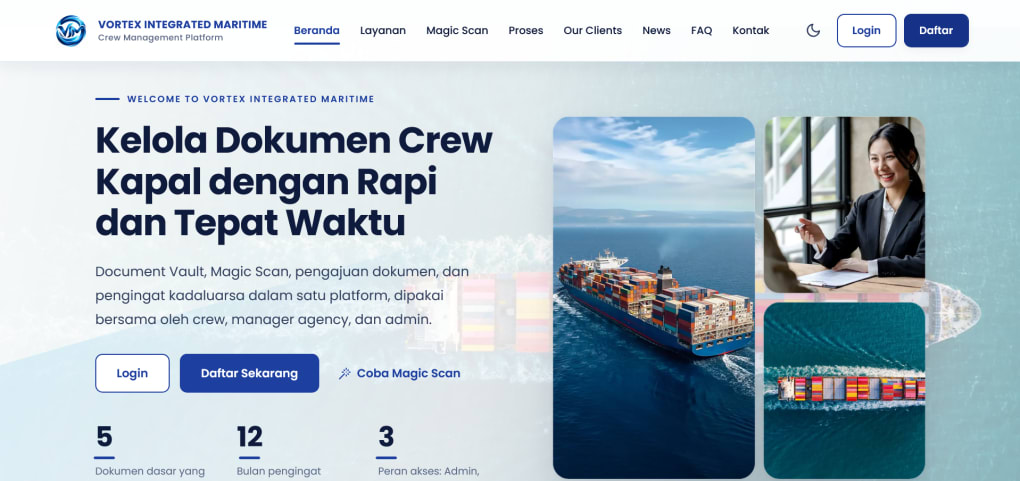
Overview
Vortex Crew is a role-based web platform that a maritime crewing company uses to collect, verify, and monitor the documents every seafarer needs to work at sea: passports, seafarer books (Buku Pelaut), STCW certificates, medical certificates, and visas.
It replaces scattered files and manual follow-up with one system that reads documents with AI, checks the result against deterministic rules, tracks expiry dates by urgency, and generates a crew CV automatically. It serves three roles (Admin, Agency Manager, and Crew), runs on desktop and mobile, supports light and dark themes, and installs as a Progressive Web App.
| Type | Web application, installable PWA |
| Roles | Admin, Agency Manager, Crew |
| Backend | Google Apps Script (V8), Google Sheets, Google Drive |
| AI | Vision models through a failover provider chain (Anthropic and Google Gemini adapters) |
| Version | 1.1.0 |
The Problem
A seafarer cannot board a vessel with a lapsed certificate. Yet the documents that decide deployment (passport, seafarer book, BST, SAT, CCM, medical, visa) expire on different schedules, are photographed in uneven quality, and usually live in chat threads and personal folders. Agencies need to know three things at any moment: what is on file, who owns it, and what is about to expire.
Three requirements followed from the client's evaluation of the earlier baseline, which produced 17 numbered findings:
- Data entry had to be faster and less error-prone, without trusting an AI model blindly.
- Expiry had to be visible early and ranked by urgency, per role and per scope.
- The whole system had to run inside the client's existing Google Workspace, with no new servers to operate.
Constraints That Shaped the Design
Choosing Google Apps Script as the backend was a deliberate trade-off, not a default. It removes hosting and database operations, and the client already lives in Sheets and Drive. It also imposes hard limits that drove several decisions below:
- No native PBKDF2 or password hashing, so the cryptography had to be implemented in pure JavaScript.
- Execution quotas and slow sheet reads, so hot paths had to be designed around a bounded number of reads.
- Cache entries are size-limited, so large summaries are chunked.
- An Apps Script web app cannot serve a web manifest or service worker at the domain root, so the installable PWA is built as a static shell hosted separately.
Architecture
Browser: single-file client, PWA shell on static hosting
   |
   |  JSON actions over one RPC endpoint
   v
Apps Script web app (V8)
   |-- Route table: public routes, role-gated routes, session check
   |-- Services: auth, crew, documents, scan, notifications, CV, master data
   |-- Engine adapter: provider chain with failover
   v
Google Sheets (records)   Google Drive (private files)   CacheService (sessions, caches)
                                   |
                        Vision model APIs (Anthropic, Gemini)
Every action goes through a single route table. Each route declares whether it is public and which roles may call it. Anything not in the table is rejected, and denied calls are written to an audit log. Managers are scoped by agency, company, or vessel, and that scope is enforced in one place rather than per screen.
Key Features
Document Vault
A central record for each crew member covering passport, seafarer book, BST, SAT, CCM, Rating, Able, medical certificate, visa, and other named certificates, with an ID photo. Files are stored in a private Drive folder and opened only through the application, according to role and scope.
Magic Scan v2
Users photograph or upload a document and the system extracts its fields: holder name, document number, issue and expiry dates, Seafarer Code, and for passports the machine readable zone. It supports several documents per session and several pages per document, so a seafarer book can arrive as one image or as separate page images.
Nothing is saved automatically. The user reviews the extraction, confirms which crew member owns the document, and only then saves. Processing starts only after explicit consent to AI processing.
Quick Magic Scan Before Login
The sign-in dialog offers a quick scan of a certificate or seafarer book that extracts the 10 digit Seafarer Code, so a user does not have to look it up or retype it. Login itself accepts an email, a username, or the Seafarer Code.
Expiry Monitoring
Documents enter the notification list when their remaining validity falls within a configurable window (365 days by default) and are ranked into four levels: info, warning, urgent, and expired. The 5-year validity rule is applied to BST, SAT, and CCM. Each role sees only its own scope, users can snooze or dismiss items, and an optional daily email digest lists names and expiry dates without document numbers.
Submission Workflow
Document submissions move through Pending, Processed, Completed, and Delivered, with Cancelled as an exit state. Non-admin users can only move a request forward, and managers can mark delivery within their scope when the admin setting allows it. Per-company WhatsApp group links are validated against an allowlist of hosts.
Automatic CV Download
One click on a crew profile fills the client's CV template (DOCX) from the profile, the Document Vault, and the ID photo, which is center-cropped to the template frame without distortion. Fields the system does not hold are entered once in a dedicated card. The CV is generated on demand and is not stored in Drive.
Admin Console and CMS
Admins manage agencies, companies, vessels, and manager assignments, review profile claims, reset passwords, change settings, and edit landing page content (banners, careers, news, clients) without touching code.
Account Lifecycle
New hires can register without an agency or vessel and attach them later. Optional email OTP verification, a profile claim approval step, soft delete with permanent purge, and bilingual privacy policy and account deletion pages cover the full lifecycle.
Engineering Decisions
1. The model proposes, deterministic code decides
AI extraction is treated as untrusted input. Passport machine readable zones are validated with the ICAO 9303 check digit algorithm (weights 7, 3, 1). When a check fails, the parser tries a known OCR confusion repair (for example letter O to digit 0) and accepts the result only if every check digit then passes. Extracted values are normalized, pattern-checked, and compared to the existing crew record.
Matching produces named evidence such as KODE_SAMA (same code) or LAHIR_BERBEDA (different date of birth) rather than a single opaque score. A conflicting Seafarer Code blocks Crew and Manager from saving, and an Admin must explicitly confirm.
When validation flags a problem, such as a failed checksum, a malformed number, or low legibility, an optional larger model can be called for a second pass. The common case stays on the fast model.
2. Defense against prompt injection
The extraction prompt declares everything printed on a document to be untrusted data and forbids following instructions found in it. Output is constrained by a strict JSON schema (tool use on one provider, response schema on the other), and fields that are not clearly printed must be returned empty rather than guessed.
3. Provider failover
Up to three fallback providers can be configured. A provider that fails on a network error, a 5xx, a 429, or rejected credentials is skipped for a cooldown (5 minutes, or 1 hour for authentication failures) and the same request moves to the next one. Retries are limited to 429 and 5xx within a fixed time budget, and API keys are redacted from logs.
4. Latency by design
- Images are resized (long edge 1600 px), corrected for EXIF rotation, and re-encoded as JPEG on the device before upload.
- Drive writes are moved off the critical path: results appear first and files are staged afterward, bound to the result by a SHA-256 hash.
- No script lock is held while calling an external API.
- Sheet reads on hot paths are bounded, and tests assert that read counts stay constant as the dataset grows.
- Client concurrency for batch scans is configurable, so each result appears as soon as it finishes.
5. Authentication and session security
- Passwords are hashed with PBKDF2-HMAC-SHA256 (100,000 iterations by default) with a per-user salt, then bound to a server-side secret (pepper) with HMAC. The primitives are implemented in pure JavaScript because Apps Script has no native equivalent.
- Comparison is timing-safe. Unknown accounts still pay the same hashing cost, and the error message is generic, so the login form does not reveal which accounts exist.
- Failed attempts are limited both per identifier and per account (5 failures, 15 minute lockout).
- Legacy hashes are upgraded transparently on first successful login and force a password change.
- Session tokens are random, stored only as SHA-256 keys in the cache with a 6 hour lifetime, and can be revoked per user or globally.
- Uploads are validated by magic bytes, not by the declared MIME type, and stored in a private folder.
6. An installable PWA on constrained hosting
A build script produces a static shell with manifest, icons, offline page, and service worker. The service worker caches only the application shell and never intercepts POST requests, cross-origin requests, or API calls, so no personal data enters the cache. Navigation is network-first with an offline fallback, and a new version surfaces an update banner instead of taking over silently.
Static hosting ships with HSTS, nosniff, frame denial, a restrictive Permissions-Policy, and a Content Security Policy (currently in report-only mode).
7. No third-party runtime dependencies
The client is a single HTML file with inline CSS and icons. Bootstrap and Font Awesome were removed, fonts are embedded, and there are no CDN calls or third-party trackers.
Interface and Experience
- A three-layer design token structure (primitive, semantic, component) with light and dark themes that follow system preference and can be toggled.
- Motion is disabled under
prefers-reduced-motion. - The sidebar becomes a drawer on narrow screens, and the crew profile collapses to a single column on mobile.
- Alerts, toasts, and form errors share one design with four types: success, failure, warning, and information.
- The landing page publishes its FAQ as structured data and hides optional CMS sections automatically when they are empty.
Quality Engineering
- 134 automated tests pass using Node's built-in test runner, with mocked Apps Script services and jsdom for client flows. Coverage includes cryptography, backend rules, scan matching, failover, CV generation, PWA behavior, and UI.
- ESLint runs clean on backend and client scripts.
- A traceability matrix maps each of the 17 client findings to its source files and the tests that prove it.
- Screenshots at 1440 x 900 and 390 x 844 are produced with Playwright as visual evidence.
- Project documentation separates what is tested from what still needs measurement on a live deployment.
Privacy by Design
- The Seafarer Code, a non-secret identifier, never replaces a password.
- Audit entries record who did what without storing document contents.
- Optional personal fields used only for the CV are kept separate from core profile data.
- The AI consent text is versioned, and documents go to a model provider only after consent.
- Privacy policy and account deletion pages are available in Indonesian and English.
Tech Stack
| Layer | Technology |
|---|---|
| Backend | Google Apps Script (V8 runtime) |
| Data | Google Sheets, Google Drive, CacheService |
| Client | Single-file vanilla JavaScript, inline CSS |
| PWA | Web App Manifest, Service Worker, static build script |
| AI | Anthropic Messages API, Google Gemini API, with failover |
| Documents | DOCX template filling for CV generation |
| Testing | Node.js test runner, jsdom, ESLint, Playwright |
| Hosting | Static hosting compatible with Vercel, Cloudflare Pages, and Netlify |
Roadmap
- Enforce the Content Security Policy, currently deployed in report-only mode.
- Move image preprocessing into a Web Worker once the iframe policy allows it.
- Measure
fetchAllagainst client-side parallelism for batch scans, and measure latency percentiles on the live deployment. - Run Lighthouse audits and install tests on physical Android and iOS devices.
- Store work history so the generated CV can include previous vessels.
Takeaways
The most useful lesson from this project is where to place trust. The model reads, but validators, matching rules, and a human review step decide. Constraints of the platform, such as missing cryptography primitives and no manifest at the domain root, were solved at the architecture level instead of being worked around in the interface. The result is a system that a small operations team can run entirely inside tools they already use.